


Background


I had never used an Apple computer before I began working for the New York City DOE back in 2005. That year I had a technology coach show me how to use GarageBand to create a song. It made it easy to get creative, so I dove in a made educational songs that I sang with students and soon I had them start making their own. That would lead to digital stories, digital game-based-learning, student film festivals, and more all made possible through Apple hardware and software.
I had become fairly adept after a few years and in 2009, despite what I now view as a rather pathetic application video, I was accepted as part of the Apple Distinguished Educator Program. It’s been a wonderfully informative and beneficial experience that through the guidance of other ADEs in New York and outside of it, my instruction has continued to flourish. Since then the technology has changed greatly. I no longer have my iPhone 3G and the iPad came into existence and went through over a dozen upgrades. Despite all the changes though, there are things that Apple still does better than any other company and that’s empowering creativity and making learning accessible to all. In fact, about 4 years ago Apple tapped Leslie Schecht, the director of technology for District 75 (my district), to promote the work we’re doing for special needs students using tools like the iPad. We have since been recognized as an Apple Distinguished District.

Apple’s Announcements
Apple’s announcement on the 27th sought to reaffirm their commitment to education, creativity, and privacy. Their focus was heavily on providing tools to empower project-based learning initiatives to make school more engaging and meaningful. That last piece about privacy is very important when we’re talking about student data especially in the wake of ongoing issues with companies like Facebook. Apple provides school and parent privacy guides to allay those fears. So here’s a look at what they announced.
Hardware

Configuration


The best part about iPads are the apps which I’ll delve into more below, but it can be difficult to set up and manage iPads for a large class of students especially if you have to make sure everyone gets their assigned iPad. That’s also less cost-effective requiring a 1:1 setup. That is why Apple created Shared iPad where, like a Chromebook, students can log in with their Apple ID and get access to only their work and apps. You can even set up iPads to be set up as kiosks to be used for state testing. It will automatically disable the hardware buttons and features like dictation and the dictionary.
Software
As a teacher, I found the software to be as usual my favorite part of Apple’s announcement. It is their reliability, usability, and accessibility that make it easy to get teachers using the tools right away. And these updates will not only enhance student engagement but will make classroom management easier for instructors as well.
Apps


What sets iPads apart as an instructional tool is the extensive collection of education apps, many of which (especially for special education) are exclusively on the Apple Store. They showed some great STEM apps as examples including one of my favorites from the New York Hall of Science. There were also updates to Clips and GarageBand with new educational templates and features like new title card posters including a blackboard and notebook and a new toy box sound pack for students.
Digital Books


Augmented Reality


The new frontier in education is mixed reality which I especially love for my students who often struggle due to a lack of context for their learning. Augmented and virtual reality applications can help provide that context and Apple’s API has led to an expansion of app developers creating that content including some developers who may in your classroom. Apple trains students to program with AR in their Swift Playgrounds application.
Some of the AR apps apple highlighted were Boulevard AR, which allows you to view artworks up close in class, and Free Rivers which allows you to create your own landscape and determine the environmental impact on your desk. The also promoted Froggipedia which offers the ability to fully dissect a frog and bring it’s translucent body to life in your classroom without enduring the smell of formaldehyde..
Classroom Management


While managing students’ on-task behavior has been helped through classroom, it didn’t help to manage all the work students were doing. You had to check their progress individually on each of the Khan Academy, Quizizz, or Tynker apps. Who has time for all of that? We want to engage our students with the great apps, but we also need data to guide it. In walks Apple with the Schoolwork app that allows you to share content, track app progress, create grouping and differentiation, collaborate, provide feedback, send announcements, and easily view the progress of your whole class or an individual student. Some of the apps already integrated in addition to those above included Kahoot, IXL, GarageBand, Nearpod, Socrative, and iBooks.
It makes the iPad a much more enticing educational tool since they are offering teachers the one thing they really need – more time.
Curriculum
Coding
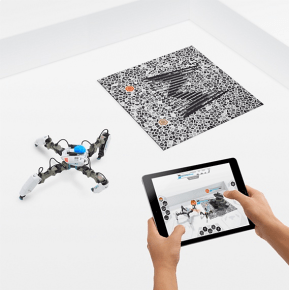
Apple’s first offering in recent years in terms of content was their Everyone Can Code program which is full-fledged computer science curriculum for K-12 students using their Swift Playgrounds software as the bridge. Swift Playgrounds can now be used to program robots, drones, and make music. The curriculum works with students in apps and offline to develop the problem-solving skills they will need in all other areas of their education as well. You can find more information in the Getting Started with Code Curriculum Guide and Swift Playgrounds Curriculum Guide which are available in several languages.
Creativity


Teacher Training


One of the best things Apple offers teachers is ongoing help in learning to use their offerings.
No matter how amazing a tool is, it is worthless if the teacher doesn’t know how to use it.
The Apple Teacher Learning Center provides training, certification, and lesson ideas and materials for teachers along with the latest updates from Apple Education. If you need a more hands-on touch, they offer Teacher Tuesdays where you can meet and collaborate with other like-minded educators and Apple professionals to learn how to make the most of what’s available in your class. Anyone can also attend any of the Today at Apple training offered regularly at Apple stores on topics for kids, artists, and educators.
What’s Missing


The actual areas where I would like to see improvement is in their MDM system. I would love it if Apple would buy out a company like JAMF and make it better and integrate it wholly into their infrastructure. And while they’re doing that they can buy out one of the major textbook companies so that their efforts to remake the publishing industry the way they did the music industry. I’d also like to see some major offering s in mixed reality, but we can hold off on that one until we learn more about the implications. So there’s definitely room for improvement, but there are many things to be happy with about APple’s continuing efforts as a force to innovate in education.