


Goalbook
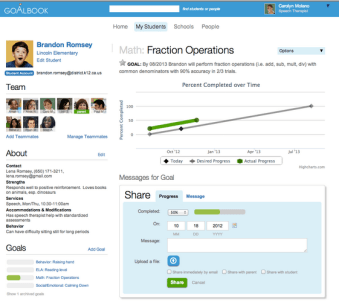

As for the system, users can select the Goal Wizard or browse the Repository to find clear, editable learning targets. The Goalbook Toolkit helps educators design the goals and create an instructional plan that’s truly individualized and not the (hopefully rare) copying and pasting I’ve seen done in some systems.
The database search engine is excellent, with filters by grade level, CCSS, and subject (Math, Speech, Occupational Therapy). Special education and English as a second language (ESL/ELL) teachers will find some goals also align with state/WIDA standards. Once found, goals can be stored as is or edited and saved in the user’s Library.
Each of Toolkit’s grade-level goals has pre-made language supporting different levels of learners. This differentiation relies on Universal Design for Learning (UDL) strategies, which are also helpfully explained. UDL info and a UDL Wizard (available from the homepage) are identical to resources found in Goalbook Pathways, a parallel site focused on instructional pathways (vs. goals). These help teachers create truly differentiated instruction based on research-based resources and strategies.
OVERALL: I find this site very helpful. The extensive database of specific learning goals and well-explained interventions will help any teacher hoping to differentiate. It is a quality resource, but it doesn’t automatically connect to SIS (student information systems), but they are willing to work with schools to help create that automation.
Power School


The platform allows for monitoring student progress, communicating with parents, and creating various reports based on student data and progress towards goals. It is fully customizable and is capable of playing a very centralized role in special education documentation. This will help save time on IEP compliance. It will allow you to expedite developing curricula, instruction, and assessment. You can then push that differentiated material to student devices. Sign up for one of their free webinars to learn more.
OVERALL: This is an amazing tool to collect student data and make it accessible to teachers and parents. The number of services they offer makes it somewhat more complicated to learn. Their mobile platform is as fully featured as any I’ve seen though. The connection with parents (log parent contacts and reset parent passwords) is a bit cumbersome. There have also been occasional issues with their online testing features.
IEP Writer
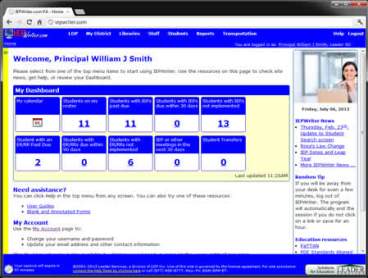

It does integrate with many other SIS systems though that is not the main purpose of the software. The suggestions for goal creation are decent and they allow for options and modifications. They have created a quality tool with a singular purpose. Take their tour for more info.
OVERALL: If you’re looking for an easy and comprehensive tool to create and manage IEPs, this will suit you well. The interface is fairly basic and their cost per student is a bit pricey though if you’re nonly using it with a few kids.
Synergy SE


Not only do they provide the document and management tools through the IEP creation process, but they offer guidance throughout the process. That includes automated guidance throughout, an online learning center, training, and support.
Of course, they offer FERPA (privacy) safeguards and a variety of reports. On top of that though it is customizable, provides notifications, allows for collaboration, has built-in communication systems, and has translation capabilities. aIn addition the have translation, email notifications, and collaboration capabilities. Edupoint offers a number of other data and instruction systems as well, but their IEP system stands out as one of the better public options I’ve seen. If you combine it with their SIS you can have grades, attendance, class sites, and student services all in one place.
OVERALL: They have so many great features and add-ons. I will say the interface can be a bit confusing for some without their training, but that’s true of most systems. Another issue is that the system is down with some regularity for maintenance which can be frustrating. These issues are common though even in NYC’s custom system.
Skyward


As for health concerns, you can get access to student allergy information, medication schedules, and nurse’s logs while remaining FERPA compliant. Related to behavior, you can track closely and determine extenuating circumstances that may have led to an outburst (time of day, staff present, etc.). Not only will this help you create a useful FBA (functional behavioral assessment), but you can, if you desire, share the data with parents to improve the consistency of behavioral measures across environments.
OVERALL: This platform is fairly easy to use, but it is limited in terms of customization that you may want. The mobile site, though useful for small details, is not as effective as the desktop platform.
eStar
I have only had limited experience testing eStar’s service, and it seems to offer most basic tools you’d expect for IEP management. They have a fully customizable bank of goals and objectives and language translation available. Their products allow for everything from an initial 504 to Medicaid reimbursement, but they seem to each be separate but integrated software components.
OVERALL: The support for the platform is solid an well-regarded. Information input and layout work fairly easily, The software doesn’t have much in terms of alerts for staff, so they need to already know what they’re doing. You do seem to have to hop around for a bit to get to some information you may need.
It is a human birthright to be a learner. There is little we do that is more important.
-Carol Ann Tomlinson
These should give you a few options to turn to, but don’t forget that, whatever system you utilize to ease management and save time, they hey to IEPs are that they are individualized. Creating one should never be a repetitive robotic exercise, because the goal is creating a guide specific to the needs of each child.

